SendOwl delivers digital products reliably and takes no cut of your revenue. Sounds fair. The model stops fitting the moment your offers hit five figures.
Here is an honest look at where SendOwl is strong and when a full high-ticket checkout wins instead.
Keep SendOwl for cheap downloads. Run high-ticket through your own checkout. SendOwl is a delivery tool with no contract, no signature and no dunning.
The real options are your own checkout, reseller platforms, cart tools and Gumroad. Above $5,000 per deal, exactly one of them survives.
- SendOwl takes 0 percent, but the plan tiers climb with your annual revenue.
- There is no contract, no digital signature and no dunning process.
- For ebooks and courses under $100, SendOwl stays a solid pick.
- On the table: your own checkout, reseller platforms, cart tools and Gumroad.
- From $5,000 per offer up, your own checkout wins.
If you only sell $29 PDFs and never offer payment plans, you can stop reading here.
Everyone else starts with the basic question. Delivery tool or a checkout built for closing?
After that come four concrete alternatives with their honest price tags. In a hurry? Jump to the comparison table further down.
SendOwl versus a dedicated high-ticket checkout
| Criterion | SendOwl | Own high-ticket checkout |
|---|---|---|
| Best fit | Downloads, courses, small prices | Offers from $5,000 on a call |
| Strengths | Flat pricing, delivery, affiliates, drip | Contract, signature, split, dunning |
| Limits | Tier climbs with revenue, no contract | Delivers no files |
| Cost model | From $39 a month, 0 percent cut | Fixed monthly fee, 0 percent cut |
What SendOwl genuinely does well
Let's start fair. SendOwl is a clean tool for its job. It delivers digital products and takes no cut for doing it.
Every plan includes unlimited products and storage. On top of that: subscriptions, upsells, cross-sells, an affiliate program, drip content and abandoned cart emails. Even PDF stamping against sharing is in there.
There is no feature gating by plan. The cheapest tier can do functionally what the most expensive one does. API and webhooks ship in every plan too.
That is rare at this price point. Most tools lock affiliates or subscriptions behind higher tiers. Here you pay for more volume, not more features.
The reach is broad as well. SendOwl sells into over 130 countries and supports 26 currencies. Payments run through Stripe, PayPal, Apple Pay and Klarna.
Now the processor fees. SendOwl's own fee doc names 2.9 percent plus 30 cents. Selling from outside the US adds another 2 percent on top.
So a US seller keeps the clean rate. Sell from Europe and you land near 4.9 percent. On a $20,000 deal that is almost $1,000.
Your real number comes from Stripe for your own account. You can test the whole thing first. There is a free trial with limits on free orders, and support lifts those on request.
Honestly, for a $49 template bundle this is a solid setup. The trouble starts when your deals grow another zero.
Where SendOwl earns its keep
- 0 percent platform cut, you only pay Stripe or PayPal.
- Flat pricing from $39 a month, cheaper on annual billing.
- Drip, PDF stamping and affiliates included in every plan.
Where it runs out at high-ticket
- Annual revenue caps per plan, only $10,000 on Launch.
- No contract, no digital signature, no closer console for calls.
- No dunning and no collections workflow for open installments.
The sales limits: where flat pricing turns into a ladder
Now for the annoying part. Every SendOwl plan hangs on an annual revenue cap. Launch at $39 allows $10,000 in sales per year.
Hold that against your business. A single $15,000 deal blows through that plan instantly. You climb the ladder before month one is over.
The middle rungs look like this. Grow costs $87 and allows $36,000 a year. Scale costs $159 and goes up to $100,000.
Fair point: the ladder does not end there. Business starts at $299 for $200,000 a year. Business Plus sits at $599 for $500,000.
At the top is Enterprise for $999 a month. That covers up to $50 million in annual sales. So no hard ceiling stops you.
And that is exactly the catch. You end up paying nearly $1,000 a month for a tool with no contract feature. The price scales with your revenue, the feature set does not.
Now look at the second number on each plan. Launch allows 5,000 orders a year, Grow 25,000, Scale 50,000. Those are huge quantities.
The order count will never bind you, the revenue tier binds immediately. The tool is calibrated for many small purchases, not a few big ones. You pay for capacity you never touch.
A seller doing $70,000 to $120,000 a month sits in Enterprise on paper. That is three closes at $20,000 each. At that point you pay enterprise prices for small-ticket plumbing.
There is one more quirk. Above your plan's bandwidth quota you pay $1 per extra GB, with a warning first. Worth noting if your courses are video heavy.
Those quotas are tighter than they sound. Launch ships 10 GB a month, Grow 20 GB, Scale 50 GB. A 2 GB video course burns the Launch quota after five downloads.
The expensive mistake
Picking your tier by revenue instead of by function. Push high-ticket through a delivery tool and you climb the ladder one plan at a time. At $999 a month you still get no contract and no dunning.
Digital delivery tool: what the model actually is
The term sounds clunky. It explains exactly why SendOwl stalls at high-ticket. The tool is built around delivery, not around the close.
Digital delivery tool: Software that automatically delivers digital files after a purchase, secures download links and processes payments through connected processors. The checkout is a self-serve flow for instant buys. Selling on calls, contracts with signatures and collections for installment plans sit outside this model.
One thing for context: SendOwl is not a reseller. You sell through your own Stripe and PayPal accounts. What a reseller does instead is covered in what a reseller is and when it pays off.
Honestly, that is a real plus. No platform collecting tax in its own name, no foreign company on the receipt. It just skips the sales layer you need on big tickets.
The gap shows up on the call. A delivery checkout knows one price and one button. A closer needs three options, a split and a signature.
Without that layer, you lose the deal in the minute after the yes.
Selling abroad: where the currency math bites
SendOwl is genuinely international. Over 130 countries, 26 currencies, checkout pages that translate themselves. The buyer's browser language decides what they see.
One detail gets missed constantly. Your default currency sits on the account, not on the product. Different currencies get set per product, one at a time.
So a London buyer sees dollars unless you switch that product to pounds. Small thing on a $39 ebook. On a $20,000 program it reads sloppy.
The fee side has a border too. Per SendOwl's fee doc, selling from outside the US adds 2 percent to the processor rate. A US seller never pays that surcharge.
This bites the first time an EU client asks for an invoice in euros. Your checkout translates itself, your product currency does not follow along.
Sales tax and invoices: solid math, manual paperwork
On tax, SendOwl delivers more than most people expect. VAT gets calculated automatically for UK and EU sales. VAT IDs are validated in the checkout and reverse charge runs at 0.00.
There are EU tax and VAT MOSS reports too. Registration and remittance stay entirely with you. SendOwl does the math, you file.
That matters stateside as well. SendOwl is not a merchant of record. Sales tax nexus in your states stays your problem, not the platform's.
Invoices get thinner. By default SendOwl sends payment receipts, not invoices. Real invoices come from a customizable email template built on UK requirements.
Sequential invoice numbers are not the default either. You switch them on manually with a prefix and a start number. For fully automated tax-compliant invoicing, SendOwl points to Quaderno, so another paid tool.
This blows up when your bookkeeper wants clean numbered invoices with no gaps. Then you are editing templates instead of selling.
What high-ticket is missing entirely: contract, signature, dunning
Nobody needs a contract for a $19 download. A $20,000 mentorship is a different animal. You want a digital signature, a timestamp and a clean PDF.
SendOwl offers none of that per its official docs. No contract generation, no signature, no closer console. The checkout is a self-serve buy flow for digital products.
Installments are not documented either. No dunning, no collections workflow for open balances. The model targets instant payments and subscriptions.
That comes back to bite when payment four of a split $24,000 deal fails. Without a signed contract and automatic dunning stages, you chase the money by hand. Not fun.
The trap I used to sell big tickets through a plain self-serve checkout. On an $18,000 deal over six installments, payment three bounced. I had a receipt, no signed contract and no dunning process.
The fix Today every close runs through a checkout with digital signature and installment monitoring. Every due payment gets chased automatically, hard cases go to collections with one click. The follow-up runs on process instead of on my nerves.
Alternative 1: your own checkout on your own accounts
For high-ticket this is the logical move. You connect your own payment accounts and keep 0 percent revenue share. On top you get the sales layer SendOwl does not have.
Concretely: a contract with digital signature, timestamp and PDF. A closer steers price, method and split live behind one single link. Installments are called Split in CloserCart and run embedded through Stripe.
When a payment fails, dunning kicks in automatically. The buyer stays on your domain with your branding the whole time. How connecting works is on the page about connecting your own payment provider accounts.
The honest flip side belongs here too. A closing checkout delivers no files, no drip, no PDF stamping. For your $29 ebook, SendOwl is simply the better tool.
This goes wrong when you try to migrate your whole catalog at once. Two tools side by side is not a compromise here, it is the plan.
Here is what getting started looks like.
- Connect Stripe and run one test payment through.
- Create the product, price points and tax setting.
- Load your contract with digital signature.
- Close your first real deal on the new link.
Insider tip
When I switch tools, I set up exactly one product with two price points first. I close one real deal on it before moving anything else. Two days later I know whether signature, payment and receipt run clean.
Alternative 2: reseller and merchant of record platforms
This group sells your product in its own name. The platform issues the invoice and remits the tax. In exchange it takes a share of every sale.
Coming from SendOwl, that is a convenience upgrade with a price tag. Instead of 0 percent you hand over a cut per sale. Tolerable at small prices, brutal on $15,000 deals.
The thinking error hides in the percentage. It sounds small and scales with your ticket size. What is a tip at $49 becomes four figures on a $20,000 close.
Then there is the receipt logic. The reseller is the official seller and files the tax itself. Your company name is not the one on your client's receipt.
That gets uncomfortable when your brand was the reason they bought. On a $20,000 engagement nobody expects a stranger as the sender.
Fair point: if affiliate reach is your engine, these platforms bring a real network. A closer look at the named providers sits in our comparison of reseller platforms.
Alternative 3: dedicated cart tools
SamCart and ThriveCart are the big US carts. Both beat any delivery tool on checkout craft. Bumps, upsells, split tests, all built in.
For a seller with mid-priced offers, that is a genuine upgrade. Conversion tooling is their whole reason to exist. And you keep your own payment accounts.
The break comes during the sales call. Your buyer says yes and wants $24,000 over six installments. There is no console for that moment, so you send a link afterwards.
It gets expensive when two hours sit between the yes and the link. Warm buying decisions cool off in exactly that gap.
Neither tool ships a contract flow with digital signature either. Where the limits sit in detail is in our breakdown of SamCart alternatives.
Anyway. As a SendOwl replacement for self-serve products, both are a legitimate choice.
Alternative 4: Gumroad
Gumroad is the simplest way to sell a digital product. Upload, share the link, done. For creators with small prices that is charming.
In exchange Gumroad takes a cut of every sale. Exactly what you never paid at SendOwl. All in, a direct sale lands near 13 percent, as the numbers in our Gumroad alternatives piece show.
So the switch would be a step backwards on cost. You trade a fixed monthly fee for a share of every deal. Contract and dunning do not change at all.
This is where plenty of people mess it up, because they only want the revenue ladder gone. What they end up with costs more per close than any SendOwl plan.
Quick pause before we move on. Here are all the options side by side.
SendOwl alternatives at a glance
| Provider | Model | Cut | For high-ticket | Weak spot |
|---|---|---|---|---|
| SendOwl | Delivery tool | 0 percent | No | No contract, revenue ladder |
| Own checkout | Own accounts | 0 percent | Very strong | Delivers no files |
| Reseller platforms | Reseller | Per sale | More marketplace | Foreign name on receipt |
| Cart tools | Own accounts | 0 percent | Solid for self-serve | No closer console |
| Gumroad | Merchant of record | Per sale | Not built for it | Cut on every deal |
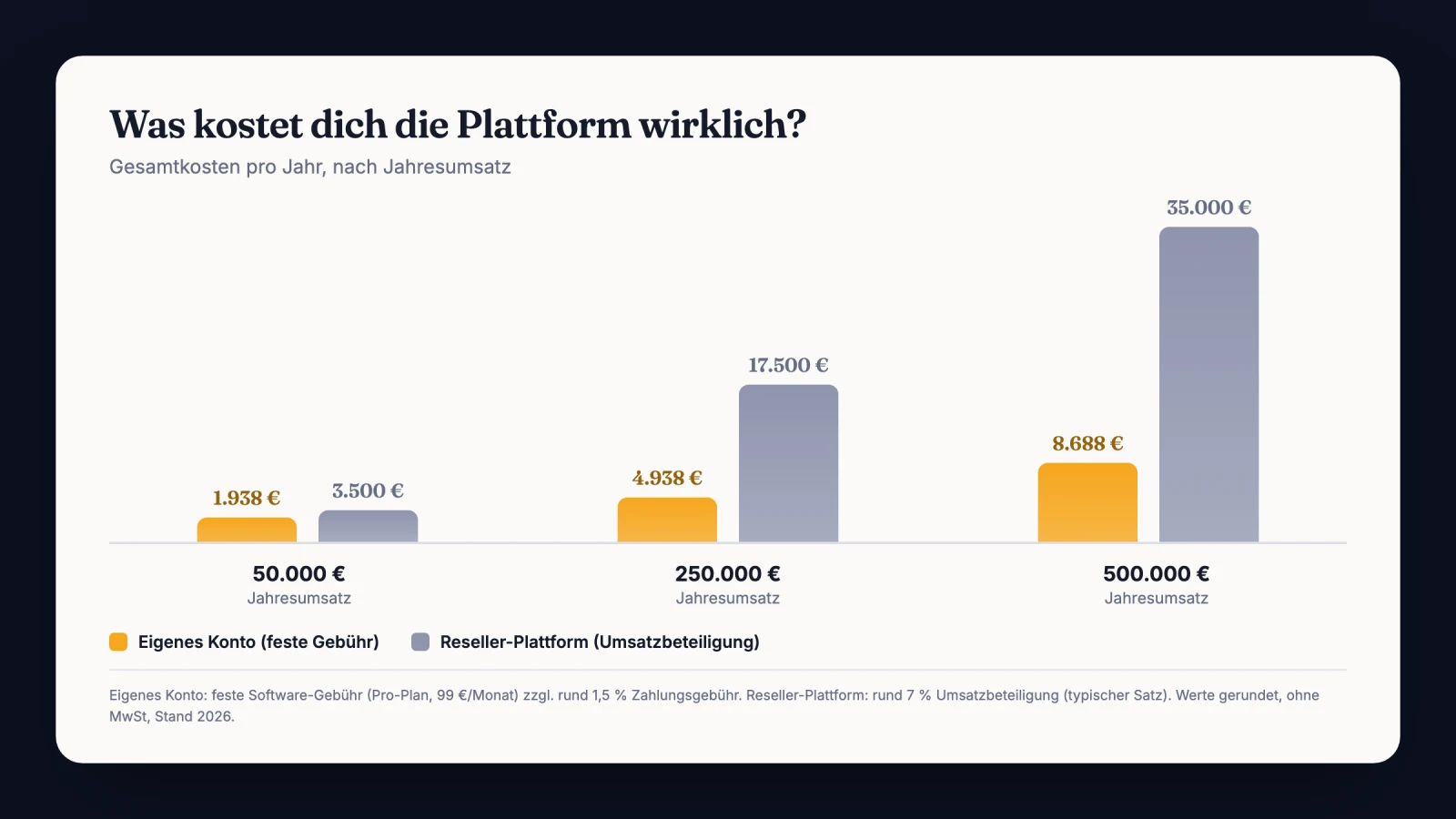
The gap between a percentage cut and a fixed fee gets brutal as revenue grows:
Want every model compared systematically? The full overview lives in the checkout platforms comparison.
Myth
0 percent transaction fee means the tool is automatically the cheapest option.
Reality
The fee is only one cost block. The tier climbs with your revenue up to $999 a month. So calculate net payout per deal, not the tool's list price.
The deal that showed me the limit problem
A guy from my mastermind sold templates and mini courses through a delivery tool. It ran well. Small prices, plenty of volume.
Then he built a consulting offer at $22,000 and wanted it in the same tool.
The first close came faster than expected. An existing client said yes on a call and wanted to pay right away. In that moment he noticed his plan had an annual revenue cap that this single deal nearly filled.
So he clicked the upgrade mid-call. Then came the next surprise. There was no contract to sign.
He emailed the offer as a PDF afterwards and hoped the yes would hold.
The client paid and everything worked out. But the close felt like a tightrope walk without a net.
Two weeks later his high-ticket offer ran through a dedicated checkout with signature. He kept the delivery tool for the small products.
That separation is the whole point. Two business models, two tools. Force both into one and you lose on one side.
Forget the question about the cheapest tool
The usual forum advice says pick the tool with the lowest fees. I think that is the wrong question. At high-ticket, close rate and payment rate decide, not the fee.
A checkout a closer can steer live closes more deals. A signed contract cuts back-outs and disputes. Dunning recovers failed installments before they turn into write-offs.
Each of those three moves more money on $20,000 deals than any fee tuning. The better metric is net payout per closed deal. Once you have seen it, you get it.
This is where people calculate themselves poor, because they see software costs and not bad debt. The fee shows up on an invoice. The dead deal shows up nowhere.
What I would do in the first 7 days
You do not have to cancel SendOwl tomorrow. The cleanest path is a split by price class. Here is how I would run the week.
- Sort your products into self-serve downloads and consultative high-ticket offers.
- Connect your own payment accounts in the new checkout and run a test payment.
- Set up your most important high-ticket offer with price points and tax mode.
- Load the contract with digital signature and click through it yourself.
- Define split plans for your typical deal sizes.
- Close your first real high-ticket deal on the new link.
- Decide whether SendOwl stays for the small products or moves too.
One mistake kills this week reliably. Skip the first real deal and only click around, and you find the gaps on payday.
Step seven is deliberately open. Plenty of people run both permanently and that is completely fine. How to build a digital offer cleanly in the first place is in creating and selling a digital product.
Before you move your first high-ticket deal
- Own Stripe account connected and a test payment completed.
- Contract with signature tested end to end by yourself.
- Tax mode checked per product, including the B2B case.
- Split plan with dunning stages set up for failed payments.
Sources
Frequently asked questions about SendOwl alternatives
What does SendOwl cost right now?
SendOwl costs $39 (Launch), $87 (Grow) or $159 (Scale) per month. Above those sit Business from $299, Business Plus from $599 and Enterprise from $999.
Annual billing drops the prices, Launch to around $32.50. Your payment processor fees come on top, plus $1 per GB over the bandwidth quota.
Does SendOwl take a revenue share?
No, SendOwl itself takes 0 percent. You only pay your processor, which SendOwl's docs put at 2.9 percent plus 30 cents, with 2 percent added outside the US. The real limit sits elsewhere: your tier hangs on annual revenue and climbs to $999 a month.
Can I sell internationally with SendOwl?
Yes. SendOwl sells into over 130 countries and supports 26 currencies, and checkout pages translate automatically by browser language.
Your default currency sits on the account, not on the product. Selling from outside the US also adds 2 percent to the processor fee.
Can I have contracts signed with SendOwl?
No. Per its official docs, SendOwl offers no contract generation, no digital signature and no closer console.
The checkout is a self-serve flow for digital products. For offers above $5,000 with a contract and a split, you need a checkout built for that.
Is switching worth it if I sell both?
Then run both in parallel. Small downloads stay in the delivery tool, high-ticket offers run through your own checkout with contract, signature and dunning. That way you use the strengths of both models instead of overstretching one.
Connect your own accounts and close high-ticket cleanly
CloserCart runs card, Klarna and PayPal on your own Stripe account. No revenue share, no annual cap, with contract and signature behind one link.
Start now for €1 14 days for €1. Cancel monthly. 0% revenue share.