ClickBank promises you affiliates, buyers in every country and zero tech work. The price is fees on every level and a model where the customer is not yours. Here is what ClickBank really costs and which alternative actually fits you.
Sell high-ticket and you run your own checkout on your own payment accounts. ClickBank is a reseller marketplace built for cheap digital products with an affiliate focus. For deals from $5,000 up with a contract and installments, the model was never built.
- ClickBank keeps 7.5% plus $1 per sale, plus payout and dormant fees.
- As a reseller it buys your product and resells it, so the buyer is its customer.
- The affiliate marketplace with automatic commission splits stays genuinely strong.
- For high-ticket: your own checkout, your own accounts, 0% revenue share.
If you sell $27 ebooks and live off affiliate traffic, you can stop reading right here.
For everyone else the closer look pays. The headline promises alternatives, so let's settle the question behind it first. Marketplace or your own account?
ClickBank and your own checkout compared
| Criterion | ClickBank | Your own checkout |
|---|---|---|
| When it fits | Cheap products, affiliate traffic, cold buyers | Your own brand, offers from $5,000 up |
| Strengths | Affiliate marketplace, automatic splits, tax handled | 0% revenue share, own accounts, customer data stays yours |
| Limits | 7.5% plus $1 per sale, payouts on their schedule | You set up Stripe and friends once |
| Cost model | Reseller with a revenue share | Fixed monthly fee, tax on you |
Why you are hunting for a ClickBank alternative at all
Usually it starts with the statement. You add up one quarter of deductions and the number feels wrong.
ClickBank keeps 7.5% plus $1 on every sale. On top come $5 per payout and, depending on the case, refund and chargeback fees. On a $15,000 program that is over $1,100 gone, on a single sale.
The second reason is control. Payouts, refunds and invoicing follow ClickBank's rules, not yours. That bites the first time a customer refunds directly with the platform.
You find out from the statement. No call, no chance to save the relationship.
The third reason is the receipt. Your buyer's purchase contract sits with ClickBank, so the merchant on record is not you. On a $27 ebook nobody cares.
What speaks for ClickBank
- The affiliate marketplace puts partners in front of you who actively promote your product.
- Commission splits and tracking run automatically, with no tech work on your side.
- As the retailer, ClickBank collects and remits the tax itself, so that job disappears.
What speaks against it
- 7.5% plus $1 per sale plus payout, refund and dormant fees.
- The buyer is ClickBank's customer, refund authority included.
- No contract flow, no signature, no collection of open installments.
The reseller model: the customer belongs to ClickBank
This is the part almost everyone skims. ClickBank is not a payment processor passing money through to you. Sounds like semantics, and it is the core of the whole model.
Retailer of record: A provider like ClickBank buys your product at the moment of sale and resells it in its own name. The buyer signs the purchase contract with the platform, not with you. Invoicing, taxes and refunds therefore run through the reseller instead of your account.
Concretely, ClickBank buys your product at 92.5% of the sale price minus $1. On subscription rebills under $40 the platform keeps 9.9%. Strictly speaking, the customer on your list is not your customer.
For an anonymous $27 product that is fine. For an offer where you work with someone for months it is absurd. The model blows up on you the day you want upsells, retention or your own dunning.
The principle is no ClickBank quirk, by the way. Other marketplaces run the same mechanics. We took the whole flow apart here: how a reseller checkout works in practice.
The ClickBank alternatives at a glance
Quick map before we go deeper. There is no single alternative, there are four paths. Which one fits depends on ticket size, market and how you sell.
Four paths after ClickBank
| Path | Known providers | Cost logic | Fits for |
|---|---|---|---|
| Merchant-of-record marketplace | Paddle, Lemon Squeezy | Revenue share | Low-ticket with affiliates |
| Self-service cart | ThriveCart, SamCart | License plus payment fee | Low-ticket funnels |
| Bare Stripe account | Stripe, PayPal | Fee per transaction | Tech-savvy solo sellers |
| Own high-ticket checkout | Own accounts, ready checkout | Fixed monthly fee | Offers from $5,000 up |
Path one is the obvious sideways step. Merchant-of-record platforms do the same job with a cleaner storefront and a friendlier dashboard. Some of them look far more modern than ClickBank.
The model does not change though. The platform still buys your product and resells it. Leave over the revenue share and you find it waiting on the other side.
Path two is the self-service carts. ThriveCart and SamCart hook onto your own Stripe account, so you stay the seller. Strong on upsells and order bumps.
Tax lands back on your desk then. Contract, signature and dunning are not part of their scope. That gap opens the moment your ticket goes four figures.
Path three is the bare shell. Your own Stripe account gives you full control over money and customers. Checkout, contracts and installment logic you assemble yourself.
That is less work than it sounds, but it is still work. Our guide to Stripe for coaches shows what such a setup looks like in practice.
Path four combines both. You use your own accounts at Stripe, PayPal and Klarna. On top come a finished checkout, contract, signature and payment plans.
At CloserCart the installment plan is called Split. The customer sees it as an agreed payment schedule inside the contract.
All the models side by side sit in the big checkout platform comparison.
The fees in detail: more than the 7.5 percent
Okay, quick detour. Everyone knows the transaction fee. Almost nobody knows the side costs, and those are exactly what add up.
There is a one-time $49.95 activation once your first product gets approved. Every product runs through an approval process first. Without a green light you sell nothing at all.
Then the recurring part. Every single payout costs $5 as a pay period processing fee. Refunds add another $0.50 to $1 on top.
Sitting outside the US? Then the priciest line hits you too. A wire payout costs $45, and a returned transfer another $20.
Chargebacks get expensive fast. They start at $22 while your chargeback rate stays under 1 percent. Between 1 and 1.49 percent it is $29 plus ClickBank's margin.
Above 1.5 percent every single case costs $49 plus margin. So the tiering punishes exactly the phase where things already went sideways. Not pretty, but that is the deal.
And the part nobody has on the radar: dormant fees. If your balance sits 90 days without new earnings, ClickBank deducts $1 per pay period.
After 180 days it is $5, after 365 days $50. An inactive account slowly melts away. Pause your business and you pay for doing nothing.
The expensive thinking error with platform fees
Never run the math with just the percentage from the pricing page. The real cost is the transaction fee plus payout, refund and chargeback fees, plus currency spread. Do six figures a month and check only after a year, and a five-figure amount is already gone.
Payouts: your money on ClickBank's schedule
Now the annoying part. With ClickBank you do not decide when the money moves. The accounting policy does.
Payouts only start above a payment threshold. The default is $100 and you can set it between $50 and $1,000,000. Below that your money stays with the platform.
The payout itself runs weekly or every two weeks, by direct deposit, wire or check. In the US that lands as a plain deposit in your bank account.
International sellers can get local currency through XACH. Depending on the country, a wire is the only route left. What does not exist in this model is your own Stripe or PayPal account where revenue lands instantly.
Compare that with your own payment account. There you see every payment in real time and set the payout rhythm yourself. That single difference decides how predictable your cash is.
Refunds: the seller does not get the call
This is where most people trip. ClickBank writes the return policy, not you.
The standard is a 60 day return window from the purchase date. Customers request their refund straight from ClickBank without asking you. You hear about it once it already happened.
The amount is the platform's call as well. If the customer already pulled the value, ClickBank may refund less than the full price. On a $15,000 program that window runs alongside you for two months.
To be fair, the buyer wins here. A neutral merchant that handles refunds smoothly lowers the hurdle with unknown vendors. That is a genuine advantage of the marketplace model.
For a premium vendor it flips. You run the onboarding, the expectations and the objections, while a third party decides on the money. Plenty of people get burned right here, because refund rate and customer communication leave their hands.
Tax and invoicing: convenient, but not yours
On tax, ClickBank honestly scores. As retailer of record the platform collects sales tax and EU VAT on digital products and remits it.
You never invoice the end customer. All billing to the buyer runs through ClickBank. For a solo seller without an accountant that sounds great at first, right?
The catch sits one level down. Your business clients get a document from a marketplace merchant instead of an invoice from you.
On a $19 product nobody asks. On a $15,000 engagement the client's accounting team asks every time. That question tends to land in the worst week of the project.
Then there is positioning. Your premium program sits in a marketplace next to a thousand $17 ebooks. The platform was simply never built for the business you actually run.
Myth
A reseller platform takes all the tax work off my plate, so it is automatically the better choice.
Reality
The platform handles the remittance because it is the seller. That is exactly why it also owns the customer relationship, the invoicing and the refund authority.
So you trade tax convenience for control over your own business. With a sales tax tool and a clean setup, tax on your own accounts is very manageable.
What ClickBank is still genuinely good at
Staying fair. There is one area where ClickBank beats most alternatives: the affiliate marketplace.
Thousands of affiliates browse it looking for products to promote. ClickBank handles the commission splits automatically, and the tracking too. You never chase a partner's numbers or run affiliate payouts yourself.
That is a real core promise, and the reseller model is what you pay for it. If you have a low-ticket product and want reach through other people's lists, few systems are more convenient.
The honest question is whether you are that seller. If your deals run through a call, an offer and a contract, the best affiliate marketplace on earth does nothing for you.
Insider tip
I always split this decision into two questions. First: where does my traffic come from, other people's affiliate lists or my own content and setters? Second: do I close anonymously on instant checkout, or with a call and a contract?
Answer both with "affiliates and anonymous" and a marketplace is right for you. Everyone else builds on their own accounts.
The month the model landed on my feet
Quick story from the field. A few years back I helped a consultant move his offer. He sold a $15,000 program, and in good months his sales team wrote over $300,000 in contract volume.
He had started years earlier with a small video course on a reseller platform. It worked, so nothing changed, even when the tickets got ten times bigger. Nobody had ever run the numbers.
Then one single month made all of it visible. A corporate client needed a clean invoice from the consultant and got the marketplace merchant's document instead. Their accounting team parked the payment and wanted the contract situation explained first.
At the same time another client refunded directly with the platform, mid-engagement. No call, no question, the money was simply gone. He read about it in the statement.
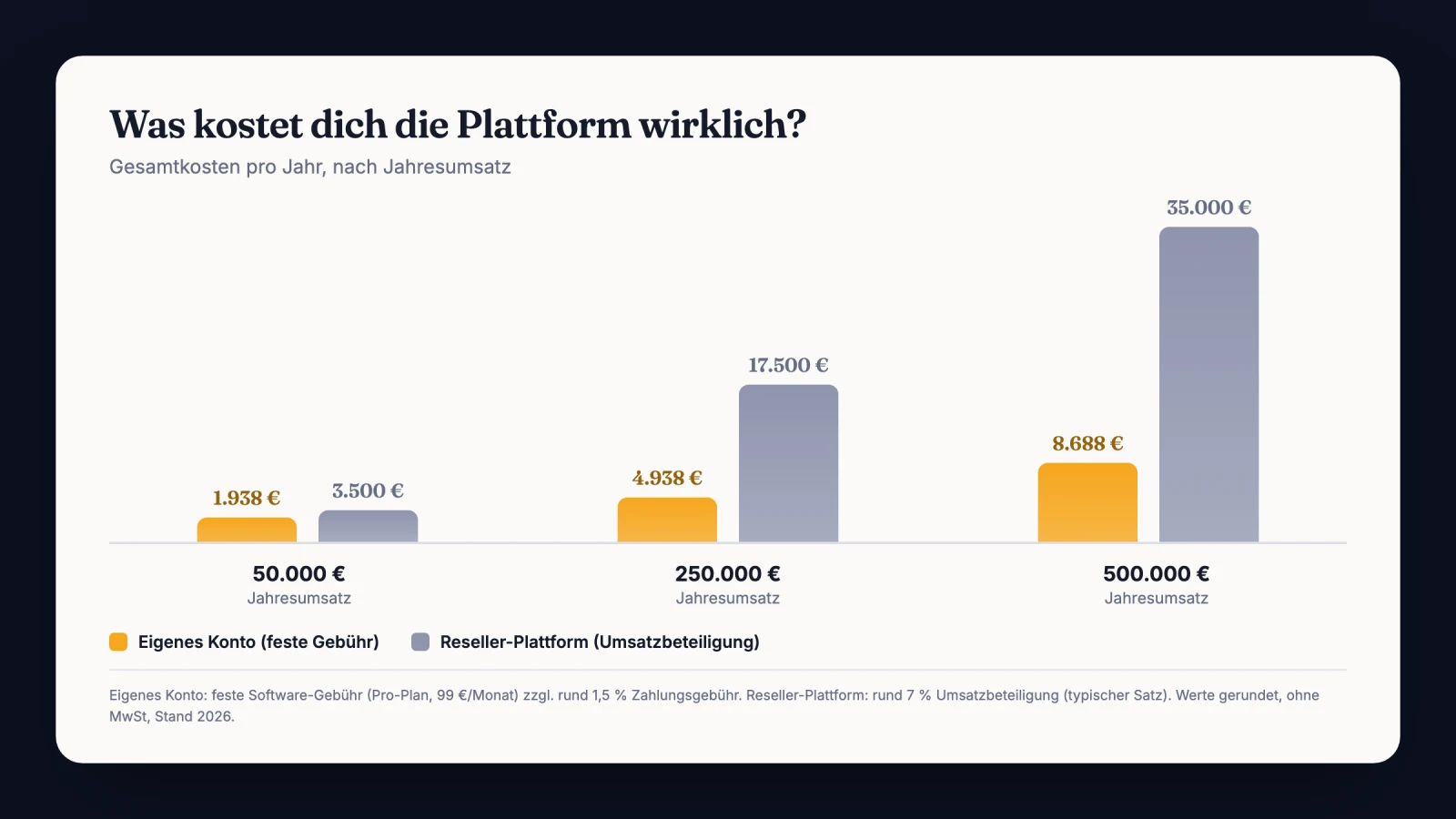
We sat down one afternoon and went through the yearly numbers. The revenue share for that year was six figures.
That is a full sales team. Not fun.
Moving to his own accounts with his own checkout took under two weeks. Contracts, invoices and installments have run through him since. The platform was never the villain, it was built for a different business.
Uncomfortable take: the fees are not the problem
Here I break with half the internet. The usual comparison posts stack fee rates against each other and crown the cheapest provider. That is the wrong metric.
7.5% hurts, sure. But paying 5 or 9 percent does not change your business model. The question that decides everything is who owns the customer and who controls your money.
Use a different number instead. What does missing control cost you per year? A corporate payment on hold, a platform refund mid-project, a payout waiting on a threshold.
None of those line items appear on any pricing page. So pick the model first, then the provider. Our guide on how to switch payment providers walks through the move without losing revenue.
Across a year, the gap between a revenue share and a fixed fee looks like this:
What high-ticket really needs and ClickBank cannot do
Once you have seen it, you cannot unsee it. ClickBank is built for the instant checkout of digital products. Customer clicks, pays, gets access, done.
A $20,000 deal moves differently. There is a call, an offer, a contract with a signature and often a Split across several months. If an installment bounces, you need dunning that collects the open amount cleanly.
ClickBank maps none of that. No contract close, no signature, no collection of open installments in the high-ticket sense. That is not a flaw of the platform, it was never its purpose.
This is exactly where your own checkout starts. Your closer sets price and payment plan live on the call. The customer signs digitally, right on the same page.
It pays off most once you have a closer team. Every closer builds their own price without any access to your payment backend. One link per customer, and the closer switches behind it live.
Payment then runs through your own accounts with your connected payment providers. The money flows straight to you, with nobody in between.
The trap: I once tried to sell a $12,000 offer through an instant checkout, like an ebook. Result after six weeks: over 300 clicks on the payment page, five closes, and three of them wanted different terms afterwards. Without a contract, every change put me back at square one.
The fix: I moved the close from the click into the call. Call first, then the offer with contract and signature, then payment or Split through my own checkout. Since then there is exactly one link per deal, and whatever was agreed sits signed in the PDF.
What I would do in the first 7 days
You want out of the marketplace model and do not know where to start? Here is how I would run the first week.
- Pull your ClickBank statements for the last 12 months and add up every fee, payout and refund fees included.
- Decide the model: do you really need the affiliate marketplace, or does your revenue come from your own selling?
- Check your existing Stripe account or open one, verification fully completed.
- Set up your checkout, connect your accounts and create your closers.
- Sort out tax and invoicing with your accountant, since you become the seller of record again.
- Test the whole flow yourself, from the link through the contract to the payment.
- Move new sales onto your own checkout and let existing ClickBank products wind down cleanly.
After that the foundation stands. The rest is polish over the following weeks. Anyway.
Checklist before the switch
- Total ClickBank cost for the last 12 months calculated
- Marketplace or own account decided deliberately
- Own Stripe account verified and ready for payouts
- Checkout with contract, signature and payment plans set up
- Closers created and their access rights reviewed
- Tax setup clarified with your accountant
- Full buying flow run through once yourself as the customer
- Wind-down plan for existing ClickBank products defined
Sources
Frequently asked questions about ClickBank alternatives
What does ClickBank really cost per sale?
ClickBank keeps 7.5% plus $1 per sale, and 9.9% on subscription rebills under $40. On top come a one-time $49.95 activation, $5 per payout, plus refund, chargeback and dormant fees. The real cost sits well above the bare percentage.
Is ClickBank a good fit for high-ticket offers?
Only in a limited way. ClickBank is built for the instant checkout of digital products, not for a contract close with a signature. Your buyer also purchases from the marketplace merchant, not from you.
For a premium business with its own brand, your own checkout is usually the cleaner solution.
Who invoices the customer on ClickBank?
ClickBank does. As retailer of record the platform sells your product in its own name. It collects the applicable tax itself and issues the receipt to the buyer.
So you never invoice the end customer. With business clients that regularly triggers questions from their accounting team.
Can I offer installments for high-ticket with ClickBank?
Not in the high-ticket sense. ClickBank is built for instant checkout, not for a contract close with a signature and the collection of open installments. For offers from $5,000 up with an agreed payment plan, you need a checkout that maps contract and Split properly.
Which ClickBank alternative fits best?
It depends on the ticket. For low-ticket with affiliate traffic, another merchant-of-record marketplace is the direct equivalent. Setup stays quick and the tax work stays off your desk.
From $5,000 per offer, your own checkout on your own accounts fits better. Contract, signature and payment plan belong to the deal at that size.
Your payment providers, your money, your customer
With CloserCart you sell through your own accounts at Stripe, Klarna and PayPal. Contract, signature and Split are built in, at 0% revenue share.
Start now for €1 14 days for €1. Cancel monthly. 0% revenue share.