
You want out from under the Reseller. But the running installments make you nervous. With the right order, you switch providers without leaving a single euro on the table. That exact order is what you get here.
Switch in parallel, not with a hard cut. New sales go through the new account right away. Old installments you let run out at the old provider.
- New deals go through your own checkout starting now, so no revenue gets skimmed by a Reseller fee anymore.
- Let running installments finish at the old provider, don't cut anything off.
- Biggest hurdle: active payment plans almost never migrate cleanly on a technical level.
- Next step: get the new account live first, then mute the old one.
If you only sell small digital amounts in self-checkout, you don't need to read on here. This is for High-Ticket with running installments.
Why you lose revenue during a switch in the first place
A High-Ticket customer rarely pays the full 8,000 euros up front. They pay in installments over twelve months. Those payment plans are locked to the old provider.
Let's be honest. Cut the old account too early and the next charge fails. The money isn't gone. It just doesn't come in.
Switching payment providers: The migration of your sales processing from an existing provider to a new one. New purchases, payment data, and running installment plans all have to be handed over so that no charge fails and no customer abandons their payment.
What your own checkout gives you
- Every installment lands directly in your account with no platform revenue share.
- No more third-party branding on your brand's payment page.
- Payout on the Stripe schedule instead of waiting on the Reseller.
Where it gets uncomfortable
- You can't migrate running installments at the push of a button.
- Tax and invoicing now sit entirely with you.
- The switch takes a few days of clean setup.
How to switch without a hole in the till
The whole trick is the order. You build the new thing completely. Only then do you touch the old one.
Never the other way around. That's where most people trip up.
The expensive classic: cancel first, build later
Never cancel the old provider before the new checkout is live and tested. Otherwise you're stuck with dead payment plans and the next installment of 700 euros fails without a word.
- Set up a new account with your own payment provider, for example Stripe.
- Configure checkout, products, and splitting, and run one full test.
- Route all new sales to the new checkout starting now.
- Leave the old payment plans at the previous provider running untouched.
- Only close the old account once the last old installment has gone through.
The next close from your Zoom call lands directly in your own account, not with the Reseller anymore. That's exactly what all this effort is for.
At CloserCart, by the way, installment payment is called splitting. How to cleanly end the old contract at the end is covered in the guides on canceling CopeCart and canceling Digistore24.
What the switch really costs you in the end
A lot of people hesitate over the cost. But the Reseller is often the more expensive route. It takes a cut of every euro.
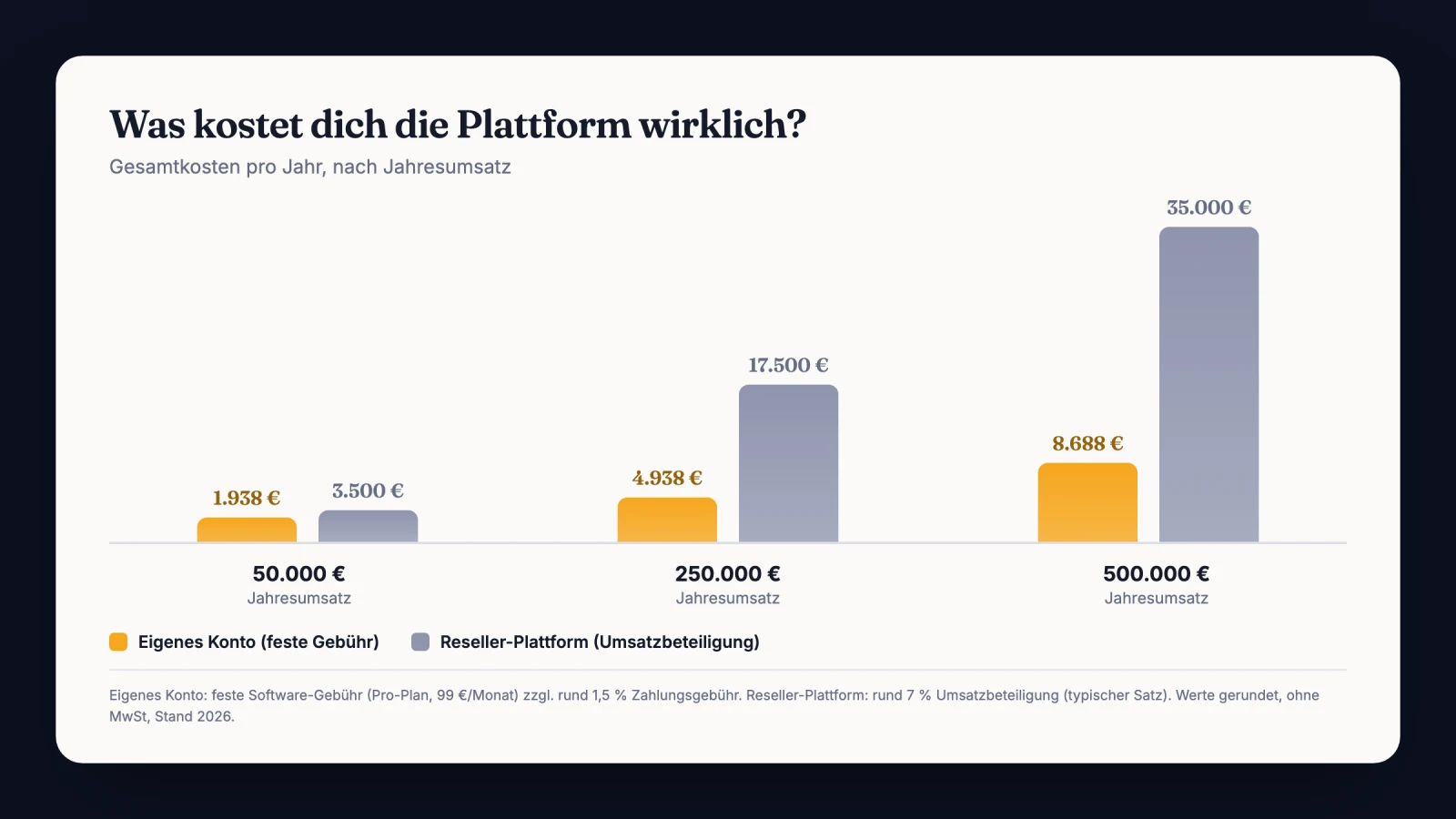
At a five-figure monthly revenue, the revenue share adds up fast. If you only compare the card fee, you miss the real cost trap.
Your own account still isn't free. Stripe charges a fee per payment, currently around 1.5% plus 0.25 euros for EEA cards (Stripe pricing). The fixed fee means the CloserCart base fee, not the payment itself.
The difference is in the size. Instead of five to eight percent revenue share to the Reseller, you only pay the low Stripe fee. Plus zero percent platform share.
Reseller versus own account
| Point | Reseller | Own account | Effect |
|---|---|---|---|
| Cost model | 5 to 8% of revenue | Fixed fee plus 1.5% Stripe | Far lower percentage load |
| Payout | Often delayed | On the Stripe schedule | Money arrives faster |
| VAT | Provider remits it | You remit it | More control and obligation |
| Branding | Third-party page | Your domain | Brand stays clean |
Which platform fits your model in the end is settled by the big comparison of checkout platforms.
What's new for you on the tax side
Okay, quick aside. With the Reseller, the platform remits the VAT for you. With your own account, that now sits with you.
If you sell to private customers in the EU, the OSS procedure often applies. It reports the VAT centrally through a single point (§ 18j UStG). You also issue the invoices yourself from now on.
That's no reason to shy away from the switch. But plan that part in ahead of time. Otherwise the first OSS filing of the quarter catches you cold.
Handing over the running installments cleanly
Now comes the annoying part. Active payment plans almost never migrate cleanly on a technical level. The card data sits with the old provider.
My approach with active payment plans
I never force-migrate active installments. I let them run out at the old provider and start everything new in parallel in my own checkout. After the last payment comes in, I close the old account.
The trap: I once tried to migrate 40 running installments in two days. Customers would have had to re-enter their card data. About a third would never have done it.
The fix: I let the old installments run out in peace. Only new deals ran through the new account right away. Not a single abandoned payment.
What to write to your customers with a running installment
Customers get nervous when something changes at payment time. So take the worry off them beforehand. Not pretty, but without info you get questions.
One thing matters. Say clearly that nothing changes about their running installment.
Hi [Name],
Quick admin note. We’re moving our payments to our own system. Nothing changes for you.
Your running installment of [amount] continues unchanged. Same amount, same date, same card. You don’t need to do anything.
New bookings run through our new checkout starting now. If you add another offer later, you’ll get a fresh link for it.
Questions? Just reply to this email.
Best regards [Your name]
The switch that almost cost me a customer
I had a customer on an installment of 900 euros a month. Twelve-month term. Four of them still to run.
I was too impatient. I wanted everything in my own account right away. So I stopped his payment plan at the old provider.
The plan was simple. Re-enter the card and keep it running in the new system. Sounds easy.
It wasn't. The customer missed the email with the new link. The next charge failed.
Two weeks later the feedback came in. He thought his payment was long done. He was on the verge of questioning the whole contract.
So I called and explained everything. We pulled the installment through manually. In the end he stayed on.
But the evening was shot. And yeah, I brought that on myself. Since then I don't touch a running installment anymore.
Don't wait for the last old installment
The usual advice sounds reasonable. Wait out all the old installments first, then switch. Sounds clean, right?
But it's expensive. Every new deal in the waiting period keeps paying revenue share. At one deal a week, that adds up brutally.
Myth
Only once the last old installment is through can I switch cleanly.
Reality
You can run new sales through your own account starting tomorrow. The old installments don't interfere with that. Every month of waiting costs you unnecessary revenue share.
The better metric isn't the card fee. It's the revenue share lost per month of waiting. If you're still weighing the options, the overview of elopage alternatives and CopeCart alternatives helps.
What I'd do in the first 7 days
Here's what my roadmap looks like. Seven days, one step per day. No stress and no gap in revenue.
- Create and verify your own Stripe account.
- Set up the checkout with products, prices, and splitting.
- Run one test purchase for the full amount.
- Let one real installment charge in the test.
- Swap all sales links in the funnel to the new checkout.
- Briefly inform customers with a running installment.
- Set the old provider to mute, but don't cancel yet.
Quick check before flipping the switch
- Test purchase for the full amount ran through cleanly
- A real installment was charged in your own account
- All funnel links point to the new checkout
- Customers with a running installment are informed
- Old account is muted, but not yet canceled
Common questions about switching payment providers
Do I lose running installment payments when I switch?
No, as long as you let them run out at the old provider. Active payment plans hang on the card data stored there. Cut the account off and the next charge fails. So let the old installments finish and only start new sales in your own checkout. That way no installment gets lost.
How long does the switch take?
The active part is done in a few days. A new account, checkout, and a test purchase usually take under a week. The passive part takes longer. The old installments run until the last payment plan is through. You only close the old account after that.
Do I have to handle the VAT myself?
Yes, that's the big difference from the Reseller. It remits the VAT for you, your own account doesn't. For EU private customers the OSS procedure often applies, and you issue your invoices yourself. No rocket science, but plan it in before the switch and talk to your tax advisor.
Do I have to tell my customers about the switch?
Only the ones with a running installment, and even them only briefly. Tell them clearly that nothing changes about the amount and the date. That takes the wind out of questions and cancellations. New buyers notice nothing about the switch because they buy directly in the new checkout.
Can I run the old and new provider in parallel?
Yes, and that's exactly the trick. The old provider only processes the existing installments. The new one takes over every fresh sale from day one. This overlap costs you two base fees for a short while. In return you lose not a cent of revenue and not a single customer.
Switch to your own checkout without losing a single installment
CloserCart routes new sales through your own Stripe account right away, while old installments run out in peace. Zero revenue share, your branding, your domain.
Start now for 1 € 14 days for 1 euro. Cancel monthly. 0% revenue share.* This article is not tax advice, it shares experience and publicly available information. For your individual case, talk to a tax advisor. As of: 2026.